
Remote Desktop Protocol(RDP) has now become a standard tool for companies looking for secure access to computers & servers across different locations. It offers a convenient alternative to connect to systems without requiring their physical presence.
Despite the ease of connecting remotely, there is always a risk associated with connecting remotely. Security experts have identified the increasing number of automated scans targeting RDP services. Automated scanners are systematically attempting to exploit insecure RDP services. Earlier, hackers mostly targeted large-scale businesses. Today, even small & mid-sized firms are being targeted because many remote desktop protocols are configured with basic security settings.
The challenge in maintaining security on the RDP server is not hackers utilizing advanced hacking techniques. In most cases, unauthorized access has been accomplished through basic hacks such as weak passwords, inactive account profiles, open ports, & poor access management.
The good part is that now you need not implement an extremely complicated security solution to protect your RDP server. Implementing a few basics but precise security solutions can effectively prevent unauthorized access & create a seamless experience for users.
Let us understand each solution step by step.
1. Compulsory Multi-Factor Authentication
Simply using passwords to secure remote access systems is no longer sufficient. Due to data breaches over the past few years, billions of username & passwords have been posted on the internet, many of which are either sold or are made publicly available on various websites. Additionally, even the strongest password combinations are highly exposed to the risk of phishing attacks, malware, & credential leaks.
MFA(Multi-Factor Authentication) adds another layer of security to your RDP server. Users are required to verify their identity using mobile device authenticators, security keys, or one-time verification codes.
How important is this…
Think of an employee using the same combination of username & password across multiple platforms. If any one of these services experiences a data breach, hackers might attempt to use the same username & password to log into the company’s RDP server. If MFA is not enabled, an attacker can easily access the RDP server instantly, but if MFA is implemented, a hacker will need access to the employee’s authentication device before the login.
2. Avoid Exposing Your RDP Directly to the Internet
One of the biggest security mistakes we all make is allowing public access to an RDP server over the internet. An RDP server with open ports is subjected to continuous scanning via automated scanning tools. If any RDP server is discovered during such scanning, it will straight away become a target of potential attacks, including the guessing & vulnerability scans.
Instead of exposing your RDP directly, you can:
- Use a VPN connection
- Deploy a Remote Desktop Gateway
- Restrict RDP access only to approved corporate networks.
- Implement network access control policy
For example, let us consider two businesses. The first one allows its customers to access the RDP server directly via the internet. The second one requires its customers to log onto a VPN server first before they can access the RDP server. If there is any security attack, the second company will preferably be saved from data breaches, as they have already enabled multi-factor authentication.
3. Increase User Account security & Access Control
In many cases, security issues happen within an organization as a result of giving higher access to its users than is needed. Over time, temporary or unused accounts accumulate on systems that pose a security risk. Each active account is viewed as a possible point of access.
How can the company improve its access control? Conduct a periodic review & check:
- Is the account still used by an employee?
- Does the user need administrative rights?
- Are there any inactive accounts present?
Security Tip: Businesses often review active services & overlook dormant and service accounts. By implementing a quarterly account review process, you can identify unwanted access before it turns into a security issue.
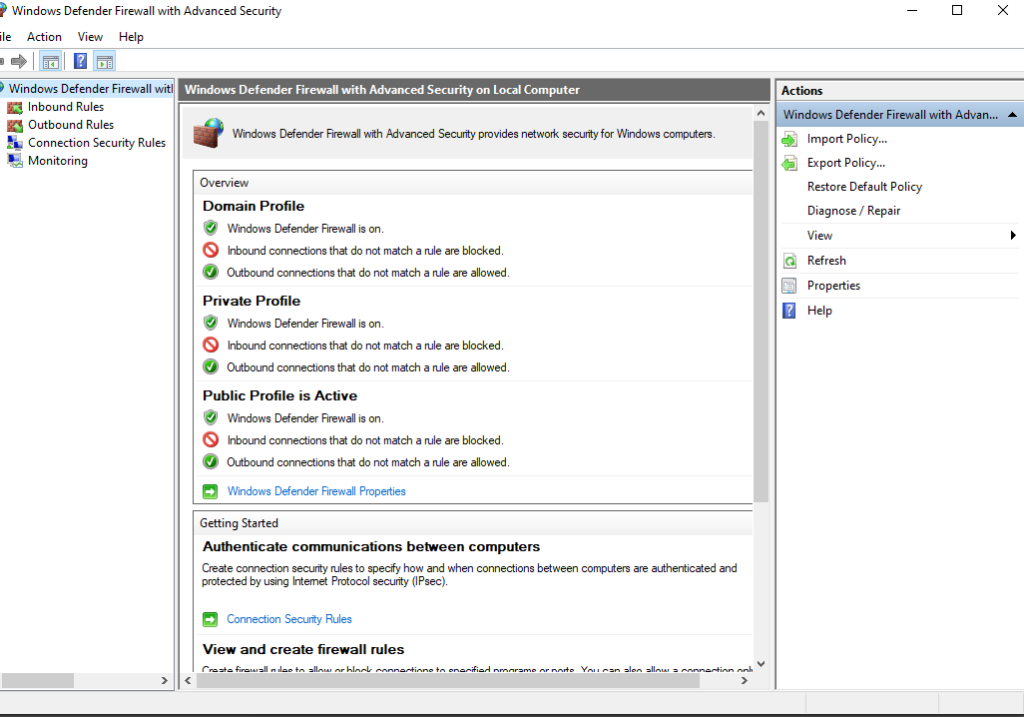
Image: Restricting RDP access through firewall rules
4. Implement Strong Password Policies
One of the most prominent causes of unauthorized access is weak passwords. Automated tools can easily test thousands of different password combinations against the servers that are exposed to the internet.
Here are some recommended password suggestions:
- Use a password with at least 14 characters in length.
- Use a combination of letters, numbers, & symbol.
- Do not include any personal information such as your name, number, or personal address.
- Do not reuse passwords you have used before.
E.g., Weak password- Rohit234 Strong password- Cloud@123#
Generally, long passphrases are easier to remember & more difficult to crack than short complex passwords.
Configure Account Lockout Policies.
The following settings need to be done:
- Lock out the user account after 5 failed attempts.
- Lock out the user for a duration of 15 to 20 minutes.
- Notify all administrators when there are repeated failed login attempts on a user account.
5. Check Login Activity & Detect Unusual Behaviour
Implementing security measures is important, but so is the visibility of user login activity. Most companies do not review user logins frequently, so they come to know about any unauthorized access weeks or months after the event has already occurred. With regular monitoring, administrators can identify potential red flags before they escalate to a security breach.
Check for:
- Multiple failed login attempts
- Logins occurring at odd hours of the day
- Logins from unknown locations
- Unexpected actions by administrators
- Login attempts from inactive accounts
Follow a new approach:
Don’t just wait for a security incident to occur. Establish a regular process for reviewing RDP logs. Spending 5 minutes a day reviewing RDP activity will help you identify trends in RDP user logins that automated RDP logs may miss.
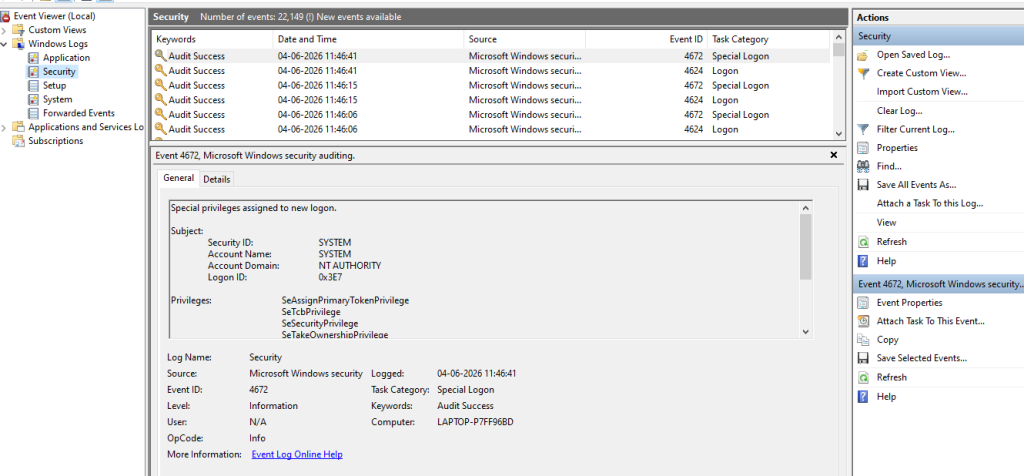
Image: Reviewing failed and successful login events
6. Update Your System Regularly
Software updates are one of the most effective approaches to security control. When vendors provide security patches to their software, they often fix the vulnerabilities that have already been identified by attackers.
Delaying application updates provides additional time for attackers to exploit known weaknesses. To implement an effective update strategy, consider:
- Test updates before production implementation in a test environment.
- Create a maintenance schedule.
- Identify & prioritize security-related patches.
- Verify successful patches after deployment.
Often, organizations focus only on preventing attacks. But if you limit the number of potential access points by eliminating unwanted services, accounts, and unused applications. This will help in limiting the number of attack paths.
To Sum Up
When it comes to securing an RDP server, it’s not just about using only security tools. Sometimes an unpredictable attack may occur because the organization has failed to follow basic security protocols. The best way to secure RDP is by reducing the chances for an attacker to gain access to your remote environment, and you can achieve this by following the above six measures to secure your RDP access.
Frequently Asked Questions
Q. What are some effective ways to safeguard against any unauthorized access on the RDP server?
A. Establishing multi-factor authentication, using strong passwords, monitoring login activity, and installing security measures updates regularly helps keep your RDP server secure. To ensure access control, its important to choose the right RDP plan.
Q. Can we access RDP over the internet?
A. Yes, RDp can be used securely over the internet, provided MFA authentication is performed via VPN, secure protocols have been established, and security control measures are in place.
Q. Why are RDP servers easily targeted?
A. It is widely used to access remote servers. Therefore, it is the most common target for automated scanning tools that search for exposed systems & weak passwords.