
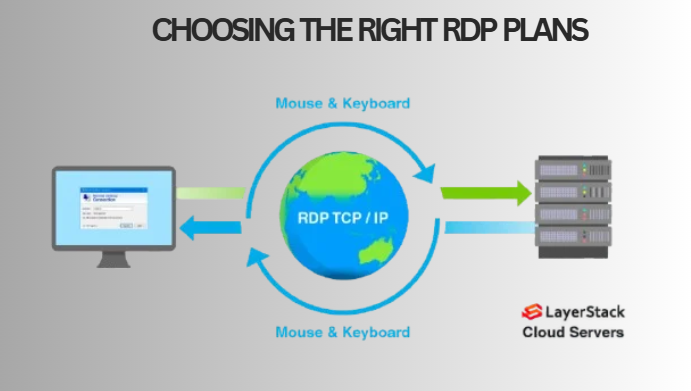
Remote Desktop Protocol(RDP) has become a go-to tool for many tech enthusiasts, whether it’s a freelancer running automation on a server based in the US, a forex trader managing live positions from Delhi, or a small team using a single workspace from three different locations. Even though it has now become a common practice to utilise RDP for routine work, figuring out the right RDP plan is still a time-consuming & confusing task.
Where Do Most People Fail?
The first thing to do is to understand what your actual use case is before comparing any plans. Most people fail as they don’t know exactly what they need and end up buying plans with wrong specifications.
A graphic designer working remotely in Adobe Premiere will have different needs than a digital marketer managing five social accounts. Both of them need RDP, but one will require 16GB of RAM to do his work & the other will require only 4GB of RAM to manage his routine tasks.
Focus on the task you are performing and choose the right plan accordingly. Don’t just compare prices and make a decision.
Step 1- Plan Your Use Case
Before any price comparison, try to answer these questions:
- What kind of software are you willing to use? Browsers & spreadsheets are lightweight tools that require less processing power compared to trading platforms or development environments(compilers) that run in the background.
- How many hours per day do you plan to use it? If you plan to run your RDP continuously for 24/7 for tasks such as trading a bot or scraping a script, you will require a written uptime Service Level Agreement of 99.9% or more.
- How many people are going to access the session at the same time? Under most plans, up to one session is allowed. If your team requires multiple sessions, then you must plan to invest in a multi-user or a private plan.
Step 2- Learn About Plan Types
- Shared RDP: It’s a good choice if you want to use it for simple web browsing, bot testing, or workflow testing. You can share the server’s resources with other users.
- Admin RDP: In admin RDP, you have complete control over your server to install & configure any software. It is the most commonly used RDP plan by businessmen.
- Private RDP: You will have the sole authority to use server resources. It’s an ideal choice for your business if it has direct costs associated with the server slowing down from other users’ access.
- Streaming RDP: The RDP is designed specifically for content creators & media productions. You will experience better performance because the server has higher bandwidth & processing power.
Step 3-Feature & Price Comparisons
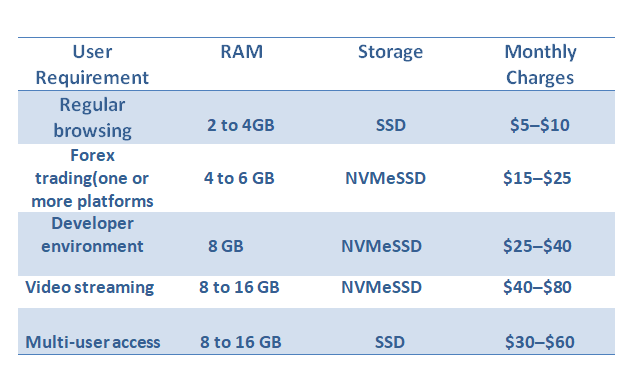
NVMe Solid State Drives offer much more speed than regular SSDs. If you access a remote desk through RDP, the difference in NVMe performance(7,000 MB/s vs 5000 MB/s for standard SSD) will result in less lag time while launching an app or switching between tasks.
Step 4- Selecting The Right Server Location
Location impacts connection speed & IP reputation.
Connection Speed: An additional distance of every 1000km between you & the server adds almost 10-15ms of latency. For eg, a person located in Chennai will find it easier to connect to the Singapore server than to the Dallas one.
IP Reputation: Companies like Google & Facebook check the IP addresses used to log in to their websites. If you are accessing the platforms from a data center with higher bot activity, then chances are that you might get flagged off.
Step 5- Check For Security
Don’t take security for granted. Check:
- If the provider has Network Level Authentication, it might block all the automated logins even before the session begins.
- Will you get DDoS protection?
- Can you whitelist your IP address for your device’s safety?
- Is there any additional cost for backup storage?
The default RDP port 3389 is scanned by the bots across the world during regular intervals. Either the provider will change the port, or you can do it yourself. If the port security is not mentioned by the provider, stay alert.
Step 6- Begin With Monthly Plans
Always start with a monthly plan before making a shift to quarterly or annual billing plans.
During the first month:
- Use your device to ping the server IP. Anything under 50ms is usually considered excellent.
- If possible, conduct a speedtest.net within your IP session to verify your actual bandwidth.
- Leave the connection & browser tab open overnight.
- Create a support ticket for your non-urgent questions.
What Providers Skip About The Pricing
Mostly, low-cost plans are hosted on congested servers. Therefore, the amount of resources allocated by the host will exceed what the physical server can actually deliver. The server will slow down during peak hours ( from 9 am to 12 pm) in the morning & (7 pm to 10 pm) in the evening.
If you rely on RDP solutions to generate income, then a ₹800 monthly plan that drops twice a week will cost more than a ₹1500 monthly plan with 99.9% uptime, while accounting for lost revenue.
For eg, a single missed session might cost you missing a trading opportunity or delayed delivery to a client; in both cases, you might lose more than ₹700 difference in the monthly plan.
Wrapping Up
Select a plan based on your actual work requirement. If you are using RDP for professional or any other income-generation work, prioritize uptime & security as opposed to the cost. Try to select a server location nearest your client’s location. Always test your RDP on a monthly basis before signing up for a long-term contract. A one-month RDP plan in the real world will give you a clearer picture than any other specification sheet.
Frequently Asked Questions
Q. How different are RDP & VPS?
A. A VPS provides you with a virtual machine, including the operating system, which you can easily configure. On the contrary, an RDP plan is pre-configured with Windows & is ready-to-use. That means you don’t have to configure it manually. RDP is the best choice for beginners, whereas VPS is a better choice for someone who needs complete control over the OS & Linux environment.
Q. Is shared RDP secure enough for business use?
A. For routine business tasks such as mailing, shared RDP is safe, provided the provider properly isolates users’ accounts. In case of handling the client’s financial or private data, it’s better to choose either admin or private RDP & enable IP whitelisting.
Q. What is the RAM requirement for forex trading?
A. For running a single platform( MT4/MT5) with up to 10 charts, you need a maximum of 4GB RAM. But, in the case of running two platforms or any expert advisors, you may require 6GB RAM.
Q. What will happen with my data if I cancel my subscription?
A. Most providers will discontinue subscribers’ access to the services immediately & delete all their data within a period of 7 to 30 days from the date of cancellation. You should download and save any private or confidential information before your bill date & verify your provider’s data retention policy.
Q. Why do I face connection issues with my RDP?
A. You may face disconnection due to a temporary disruption in your local internet, a timeout session, or due to overloading in the provider’s server. Check your internet connection first, and then review the provider’s portal to see if there is an option to configure an ongoing live session.