
While planning to establish your online presence, the first thing to determine is which type of IP architecture to use: shared or dedicated. The choice you make will affect your internet presence. A wrong selection can potentially damage your business operations by directing communications to spam folders or restricting the speed of your business’s automation process.
In the article, you will not just learn the definition of IP addresses, but you will also understand how they relate to your current digital environment. We will analyze deeply the core differences between shared & dedicated IPs across email systems, hosting networks, and secured connections, so that you can make an informed decision for your business operations.
Defining Shared & Dedicated IP Addresses.
Shared IP Addresses
A shared IP address is a single identifier for hundreds or thousands of different users, websites, or email senders working at the same time.
For example, just like using public transport, you are sharing the space, route, & reputation with your fellow passengers. It is highly economical, but you have no control over who you are sharing your space with, which may badly affect your work or maybe the entire group.
Dedicated IP Addresses
A dedicated IP is an identifier assigned exclusively to your specific account, website, or business. No third party is allowed to send data or host traffic through it.
For example, think of it like owning a private car. You are the only one driving it. You have the sole responsibility for its maintenance, quality, & speed. If it’s maintained properly, you will have a reputation. Otherwise, you’ll have to cover all the expenses.
Core Differences
- Hosting Reputation
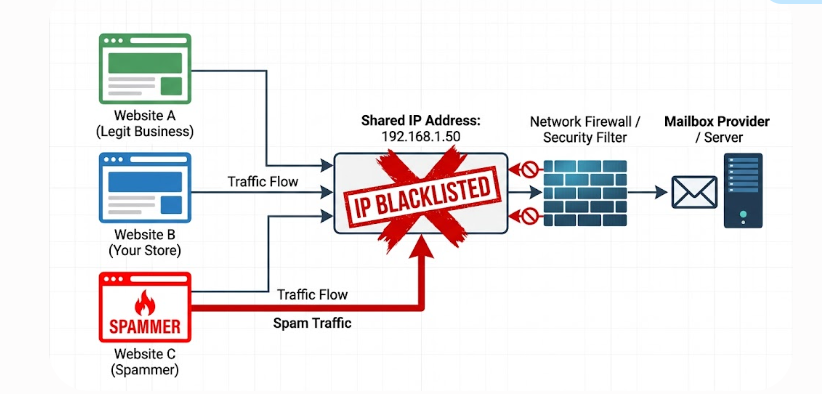
Shared IP: You share an IP address with other companies, collectively creating a “collective” reputation. If one of your shared neighbors sends out bulk spam emails or any high-volume malicious scraping occurs, your IP address gets flagged. Your work suffers when other companies engage in unethical practices you are unaware of.
Dedicated IP: You operate independently of all other organizations. The reputation you build from a technical aspect & the traffic patterns you create entirely determine your reputation. Any external security issues do not affect well-managed companies.
- Setup & Technical Maintenance
Shared IP: Implementing a shared IP is quick & is handled entirely by your service provider. No need for any technical configuration or operational warm-up requirements, as the infrastructure is already running.
Dedicated IP: The hosting company does not manage the service; you need to manage your IP address directly from start to finish. A new dedicated IP has no initial base reputation and will need a series of manual setup processes to build your traffic.
- Financial Investment
Shared IP: The cost of entry is minimal. Infrastructure costs are shared among multiple clients. Shared IP addresses are usually part of standard subscription packages without extra fees.
Dedicated IP: You are required to pay a monthly fee to your service provider for the maintenance & routing of your dedicated network.
- Speed & Reliability
Shared IP: If other users on the same server see a sudden increase in traffic or are performing any data-insensitive tasks, this could affect your site’s performance.
Dedicated IP: All your network bandwidth & processing resources will remain consistent. Your channels will remain free of transmission interference from other users, ensuring consistent speed regardless of the amount of external traffic occurring at any given time. You can also read our guide on choosing the best server location for low latency to optimize your network routing.
The New Updated Landscape
You can find many articles written years ago that state dedicated IPs are essential for a safe e-E-commerce checkout, or else they may affect your rankings in the Google Search Console. Today, the scenario is completely different. Modern technical architecture has shifted toward an entirely new direction of development.
- A shift towards domain reputation: Mailbox providers have changed from using only IP addresses to now using the sender’s domain reputation, as determined by how successfully it is authenticated for delivery ( through SPF, DKIM, & DMARC). Regardless of which IP addresses you are using, having a poorly authenticated domain will not ensure the successful delivery of your mail.
- Strict spam filters: If the spam complaint rate of your message exceeds 0.3% on all major mailbox provider platforms, your message will be rejected automatically, no matter which IP addresses you are using to send it.
- Inherited history: Unless & until you purchase a new dedicated IP address, your newly acquired dedicated IP will have an inherited list of unreliable IP addresses. You will inherit their spam-related delivery issues, which you must address through your own diligence or efforts.
Steps to Build Your Reputation on a Dedicated IP
Step 1: Technical Verification (First 3 days)
- Link your Sender Policy Framework to your sending domain.
- Configure your DomainKeys Identified Mail signature for your identity verification.
- Implement a Domain-based Message Authentication, Reporting & Conformance policy to protect against brand impersonation
- Create a pointer record to establish a clean reverse DNS lookup for your dedicated IP addresses.
Step 2: Controlled Warmup (First two weeks)
- Limit yourself to only 100 messages per day.
- Initially, send messages only to your most engaged subscribers or clients.
- Monitor your engagement rates. A high open rate indicates your IP address is trusted & safe.
Step 3: Steady Growth( 3 to 4 weeks)
- Slowly increase your traffic from 1,000 to 5,000 messages per day.
- Keep your volume consistent and reliable with no large spikes.
Step 4: Final expansion( weeks 5 to 6)
- Expand messaging output to 10,000 to 50,000 messages per day.
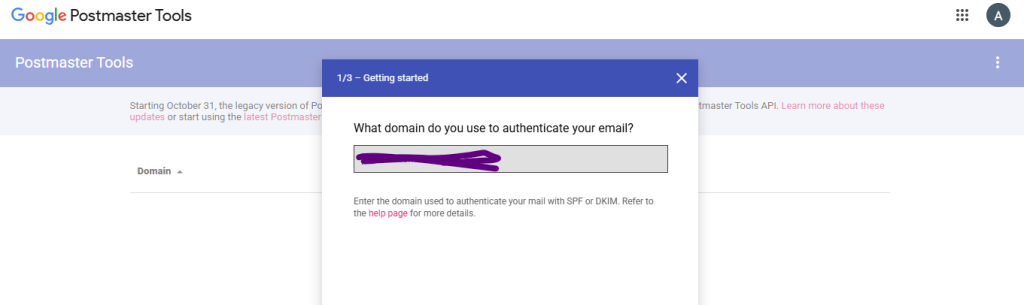
- Use your messaging performance metrics from dashboards such as Google Postmaster Tools to check complaint rates.
If you are facing any confusion as to infrastructure choices while configuring remote desktop environments, you can refer to our guide on “Shared RDP vs Dedicated RDP.”
Which One To Choose?
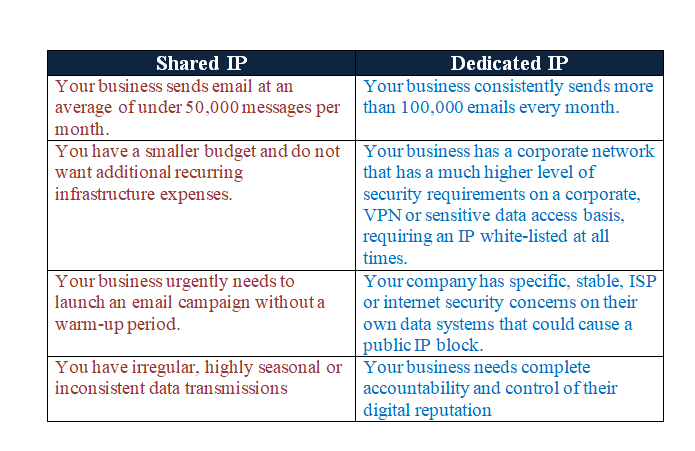
The choice between these two configurations depends on the amount of operational volume, the type of technology used, & the constraints of your business.
Frequently Asked Questions
Q. Can I improve my SEO(Search Engine Optimization) with a dedicated IP?
A. No, you will not find any improvement in your SEO with a dedicated IP. Modern search engines assess your website’s performance using metrics such as loading speed, content quality, protocol security, and mobile compatibility to rank your content.
Q. Can we operate a successful e-commerce store on a shared IP address?
A. With the invention of Server Name Indication(SNI), your website can employ the same level of security (256-bit SSL) while processing secure transactions on a shared IP address..
Q. What will happen if my dedicated IP address gets blacklisted?
A. If your dedicated IP address gets blacklisted, you must investigate & correct the issue by improving your security protocols. Submit a request to the appropriate organization requesting to remove the block against your IP address.
Q. What if I switch to another email service provider? Do I have to continue using the same dedicated IP address?
A. When you change to a new service provider, you will receive a new dedicated IP address & must repeat the same warmup process.