
A cloud-based Windows workspace allows employees to access their office desktop from any device with an internet connection. Employees’ office computers are hosted by a high-performance server located within the data center, and the server streams the real screen onto the device employees use (e.g., laptop, tablet, or mobile phone).
In the article, you will get to know some real benefits of using a cloud-based Windows in your workspace.
Benefit 1: Real Financial Savings
While considering the total cost of a traditional laptop, you must consider factors like software licenses, ongoing hardware updates, & IT support. As soon as you buy your $1500 laptop, it might almost lose all its value, especially if you purchase it just before a new operating system version’s release.
An independent research by Gartner supports this conclusion. It states that by 2027, almost 95% of workers will find hosted workspaces to be the most cost-effective solution(up from 40% in 2019).
A Microsoft-sponsored Forrester Consulting conducted research on a company with 2k employees. The study revealed:
i) An ROI of 195% over a span of 6 years.
ii) As a result of no local data storage & automatic updates in devices, security savings increased from $1.5 to $1.7 over six years.
iii) The time to set up & remove devices has almost been reduced by 90%.
iv) Onboarding time for new desk employees reduced to one week.
Benefit 2: Impact on the Environment
The cloud-sustainability report 2025 suggests that when the company shifted to a cloud-based workspace, they could reduce carbon footprint somewhere between 55 to 95kgof CO2 per staff per year, based on their workload & their location. For every 1,000 employees shifting to a cloud-based Windows workspace reduces carbon emissions by an amount equivalent to had if those 1,000 employees had planted 2,000 to 4,000 trees each year.
Example: Schneider Electric, a global provider of energy management solutions with its factory in Shanghai, China, operated over 3,500 computers on the production line. The company had to face a lot more difficulties in managing security patches & system updates.
To improve the situation, the company implemented cloud-based workspaces instead. And, the results were quite surprising:
i) A conventional industrial computer consumed 420 watts of electricity per hour.
ii) A standard desktop consumes about 65 watts per hour.
iii) A cloud-based workspace consumes only 12 watts of electricity per hour.
Benefit 3: Centralized Security
Transforming to cloud-based Windows workspaces changes the security model of your company dramatically. The data never leaves the data center of the provider. Employees can only see the interface, as the provider’s facility stores the data and applications with features like physical security, redundant systems, and professional security.
By any chance, if your laptop gets stolen, you don’t have to worry, as no data is available on your personal system locally. You can disable your cloud workspace immediately & continue your work from another device.
Benefits to small-scale businesses
Often, small businesses find it difficult to establish & operate dedicated security teams. Using a cloud-based workspace automatically enables small businesses to use the latest security patches & updates. They don’t have to install any antivirus software separately.
Benefit 4: Fast Employee Onboarding
It is quite a complicated & time-consuming process to set up a new employee with a traditional computer. There are too many steps involved in it, including purchasing hardware, installing the operating system, software applications, and security system configuration. This entire process can sometimes take up to one week or more.
With the cloud workspace, you can achieve substantial time savings. The Forrester study found that new employees working in cloud-based workspaces take approximately 1 week less time to onboard than those working in traditional setups. Companies with an employee capacity of 2,000 can expect to save between $102,000 and $537,000 over the next six years by using cloud-based Windows workspaces.
Benefit 5: Support Working Remotely
Work has evolved, so has the work environment. Employees can now collaborate across multiple devices & locations at different hours. Cloud workspaces allow for this flexibility in how employees work. An employee can begin working on a desktop computer in the office, continue working on a laptop while travelling, & complete their work on a tablet at home. They have a single workspace that moves with them. They will have a consistent experience regardless of the device they are using, as the computing happens in the cloud instead of on a specific device.
According to Dell Technologies, 97% of their employees use four or more devices to do their daily job. Hence, a cloud-based Windows workspace offers a seamless multi-device workflow.
Benefit 6: Higher Productivity
If your computer experiences any issues, it can affect your work. If there is any hardware or software crash, it may continue to function at a slow rate. This can cost the employee several hours lost in resolving the technical issues.
The impact on productivity:
The Forrester Consulting survey researched a company with 2,000 employees and discovered that employees saved 22-30% of unproductive time due to fewer hardware issues and greater responsiveness within a cloud-based environment. Over a period of 6 years, they achieved savings in productivity of almost $3.3 million.
Steps To Set Up The Cloud-Based Windows Workspace
- List all the devices your staff is currently using. Replace devices that are older than three years with low-cost endpoint devices.
- Check the internet speed from the staff’s location. Perform a simple speed test from their home location if remote working is permitted.
- Select a provider. If you are already using Microsoft 365 for your business, it will easily integrate with your existing accounts.
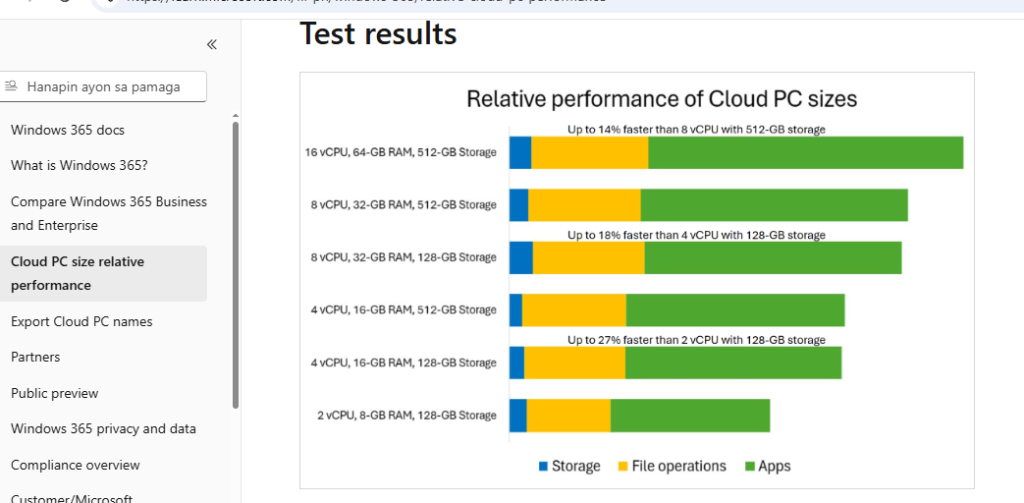
- Identify each employee’s needs. Every employee will not require the same level of computing power. List their positions & determine which configuration matches their needs.
- Begin testing with a small group( e.g., a team of five employees). Tell them to use a cloud-based workspace for two weeks. Check if any issues exist with the application performance or connectivity.
- Provide the management dashboard training for the IT staff. At least one person from your team must be trained to know how to add new users and make adjustments to user settings.
- Use a phase-wise approach for employee rollout. Start with one department, observe for the first two weeks, and then add other departments to prevent any losses before they affect all others.
Conclusion
By utilizing cloud-based workspaces, businesses can save money, reduce carbon footprints, & protect their data from breaches. The cloud-based workspace market is expected to grow from $4.84 billion to $15 billion by 2034. If your company employs any remote or hybrid employees, the question is no longer whether cloud-based workspaces are effective; it is simply a matter of when you should change to cloud-based workspaces. Not all the cloud-based Windows workspaces are identical. The two most preferred choices for cloud workspace are “Shared RDP & Dedicated RDP”. Learn more here.
Frequently Asked Questions
Q. What is the monthly fee for a cloud-based Windows workspace per employee every month?
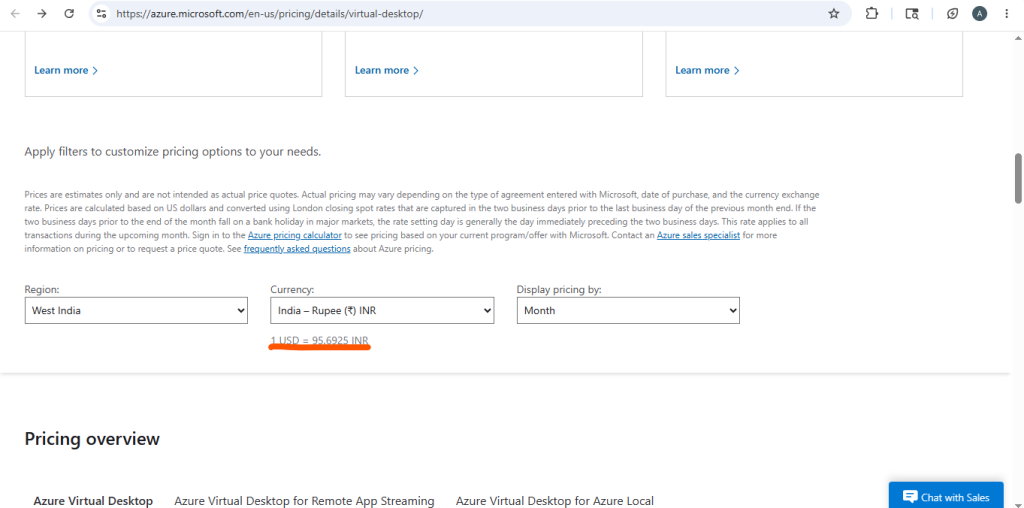
A. The current pricing is $28 monthly for a Basic Windows 365 virtual machine with 2vCPUs & 4GB RAM. The standard version costs $36 monthly with 8GB RAM & for a premium version, you have to pay $56 monthly with 16GB RAM.
Q. Which one is better for my cloud workspace- Linux VPS or Windows RDP?
A. If your company uses QuickBooks or Microsoft Office, go for Windows RDP. If your company runs web servers or uses an open-source solution, a Linux VPS is a perfect option for you.
Q. What happens if there is any failure in the data center?
A. The providers of cloud distribute their infrastructure evenly across multiple geographical locations. If any single data center fails, the system will redirect users to other available locations.